If you are registering on the AICTE Internship Portal or applying for internships through platforms like NATS 2.0, one important requirement you will come across is the Transcript Document Upload.
Many students get confused here:
👉 What is a transcript?
👉 What should I upload?
👉 Is marksheet enough or something else is required?
What is a Transcript Document?
A Transcript Document is an official academic record issued by your school, college, or university. It contains:
- Subject-wise marks
- Semester-wise performance
- Grades or CGPA
- Course details
- Official stamp/signature
👉 In simple words:
It is a complete summary of your academic performance.
Why Transcript is Required on AICTE Internship Portal?
The All India Council for Technical Education Internship Portal asks for transcripts to:
- Verify your academic background
- Check eligibility for internships
- Shortlist candidates based on performance
- Ensure authenticity of your education
Note : Many companies offering internships through AICTE use transcripts for filtering candidates.
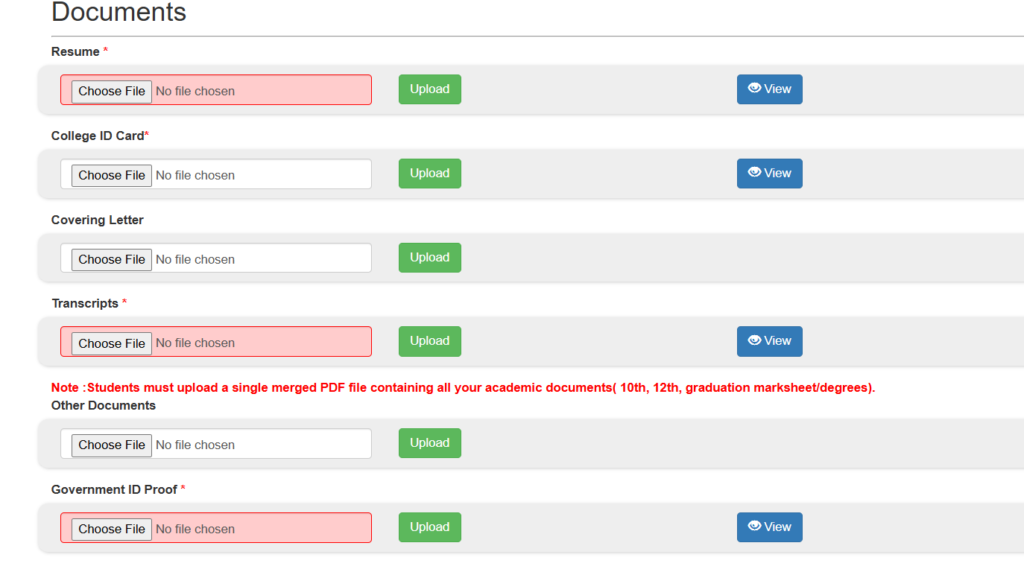
What to Upload in Transcript Document? (Most Important Section)
Here is what you should upload:
1st Option : Official Transcript
- Issued by your college/university
- Signed and stamped
- Includes all semesters
👉 This is the most preferred document.
2nd Option: All Semester Mark Sheets
If you don’t have an official transcript, you can upload:
- All semester marksheets combined into one PDF
- Clearly visible marks and subjects
- No missing semester
📌 Example:
- Sem 1 marksheet
- Sem 2 marksheet
- Sem 3 marksheet
- … till latest semester
👉 Combine all into single PDF file
How to create combind pdf document.
3rd Option: Latest Consolidated Marksheet
Some universities provide:
- Consolidated marksheet
- Overall CGPA document
👉 You can upload this if it includes all semesters.
Don’t Upload
Avoid these common mistakes:
- Single semester marksheet only
- Screenshot of marks
- ID card or admit card
- Incomplete documents
- Blurry or cropped files
Note : These mistakes can lead to application rejection.
Document Format & Size Guidelines
While uploading on the AICTE portal, follow these:
- Format: PDF (preferred)
- File size: Usually under 1–2 MB
- File name example:
👉YourName_Transcript.pdf
How to Create Transcript PDF (Step-by-Step)
If you don’t have a ready transcript, follow this:
1st Step:
Collect all your semester marksheets
Step 2:
Scan them clearly (use mobile scanner apps)
Step 3:
Arrange in correct order:
- Semester 1 → Last semester
Step 4:
Convert into single PDF
Use this tool to combine multiple files into a single PDF: Click here.
Step 5:
Upload on AICTE Internship Portal
FAQs – Transcript Document AICTE Internship Portal
👉 Yes, in most internships it is required.
👉 Yes, if combined into one PDF.
👉 Upload available semester marksheet.
👉 Yes, if clearly visible and valid.
👉 You may need to re-upload or your application may get rejected.
Uploading the correct Transcript Document on the AICTE Internship Portal is a crucial step in your internship journey.
👉 Always remember:
- Upload complete academic records
- Prefer official transcript
- Keep everything clear and organized
This small step can significantly improve your chances of getting selected for top internships.
Visit for more information : Aicte Internship Portal
🚀 Join WhatsApp Group for Latest Updates
Get daily updates on internships, government schemes, and jobs.